1. Help Center
  2. Account Setup & Registration

How Do I Create a News Feed Post?

The PLT4M News Feed can be used to communicate with your students, like a digital bulletin board

To Create a Post on Your News Feed:

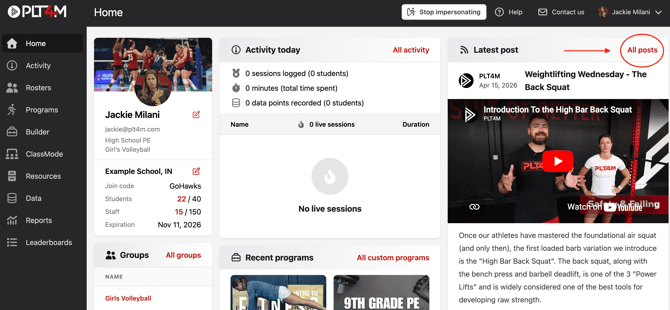
  • On the Home page, click + Start a Post

Screenshot 2025-03-13 at 10.47.57 AM

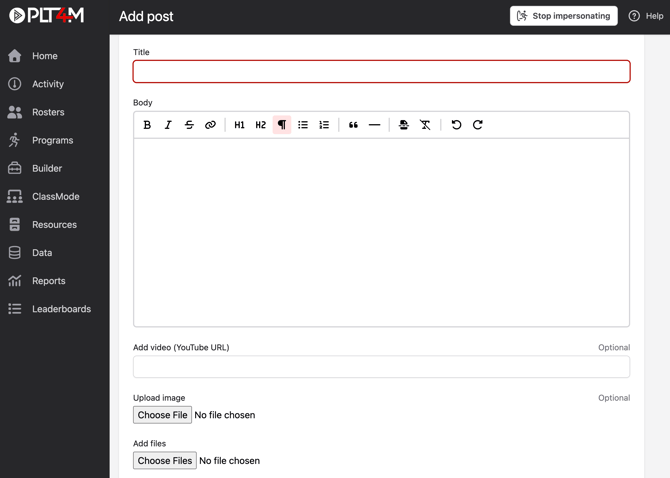
  • Create your post
    • Add a Title and Body of the message
    • Add a video (YouTube link), image, or file (optional)
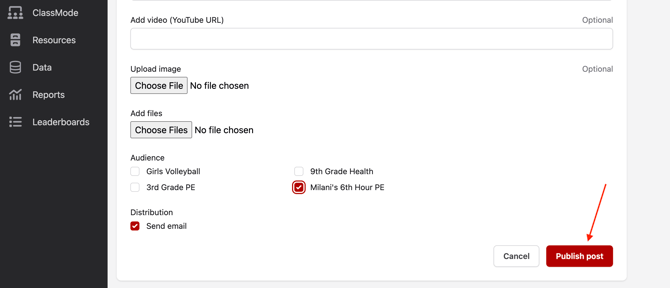
    • Select your audience - who should see this post?  If no selection, it will send to all students
    • Select the Send email box if you'd like the communication to be delivered to student emails as well as the News Feed (recommended)
       

Screenshot 2025-03-13 at 10.50.54 AM

Screenshot 2025-03-13 at 10.51.41 AM


What might you post on the News Feed?

  • Announcements such as training schedules or equipment needs
  • Workout Assignment reminders
  • Highlight accomplishments such as attendance or progress leaders
  • Videos from PLT4M’s resource tab, i.e. a video that focuses on what you’re teaching that day
  • Extra credit workouts such as ReadyFit workouts (found in the resources tab)
  • Anything you want!