---
title: Create a Workout Program
description: Use the builder to fully customize your own program in PLT4M.
---
[Skip to content](https://knowledge.plt4m.com/knowledge/how-do-i-create-my-own-program#main-content)
English
Show submenu for translations
[contact us](https://knowledge.plt4m.com/knowledge/kb-tickets/new?hsLang=en)
[](https://knowledge.plt4m.com/knowledge?hsLang=en)
- [Home](https://knowledge.plt4m.com/knowledge)
- [back to PLT4M](https://app.plt4m.com/)
Open main navigation
Close main navigation
- [Home](https://knowledge.plt4m.com/knowledge)
- [back to PLT4M](https://app.plt4m.com/)
- English
Show submenu for translations
- [contact us](https://knowledge.plt4m.com/knowledge/kb-tickets/new)
- [PLT4M Classroom](https://classroom.plt4m.com/pages/customer-classroom)
[PLT4M Classroom](https://classroom.plt4m.com/pages/customer-classroom)
Welcome to the PLT4M Help Center
- There are no suggestions because the search field is empty.
1. [Help Center](https://knowledge.plt4m.com/knowledge?hsLang=en)
2. [Programs & Customization](https://knowledge.plt4m.com/knowledge/programs-customization?hsLang=en)
April 23, 2026
# Create a Workout Program
## Use the builder to fully customize your own program in PLT4M.
### Watch the Video Tutorial:
### Follow the Steps:
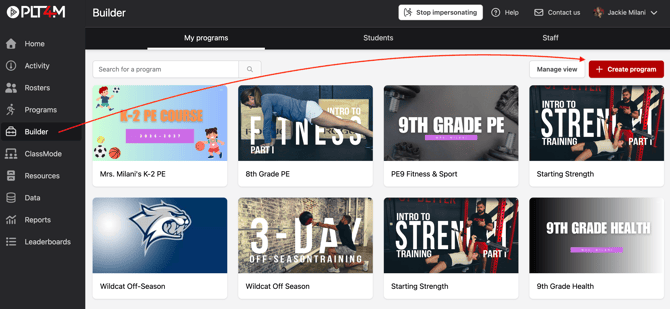
1. Navigate to the **Builder** tab
2. Choose **Create Program**
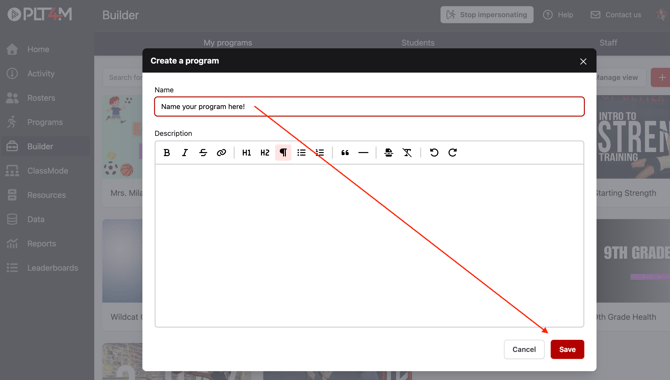
3. Name your program and choose **Save**
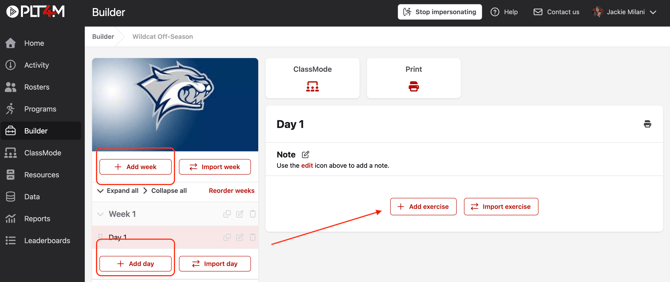
4. Use the **Add week** and **Add day** buttons to structure your program
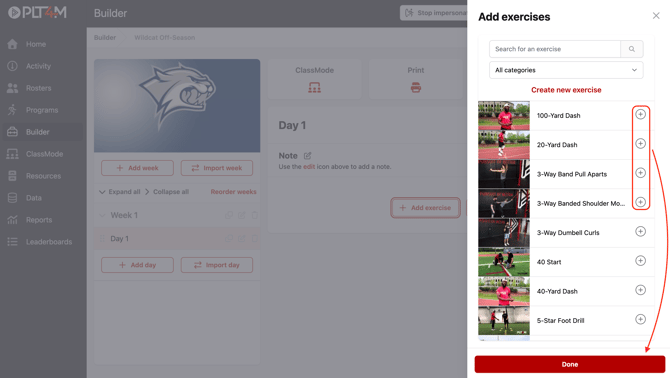
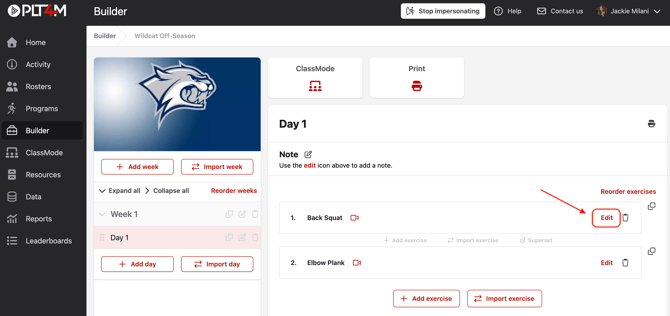
5. Click into a day and choose **Add exercise** to access the exercise library
6. Click the **(+)** to add exercises to your workout
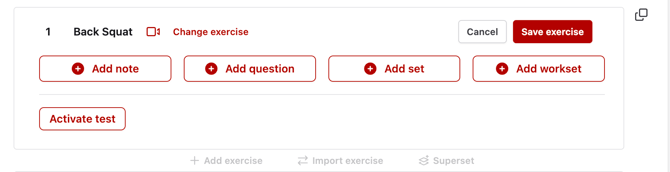
7. Choose **Edit** to add details to the exercise such as adding notes, sets, weight %, worksets, or tests
8. Click **Save** to save your work
- [Getting Started](https://knowledge.plt4m.com/knowledge/getting-started?hsLang=en#main-content)
- [Manage Your Account](https://knowledge.plt4m.com/knowledge/getting-started?hsLang=en#manage-your-account)
- [For Administrators](https://knowledge.plt4m.com/knowledge/getting-started?hsLang=en#for-administrators)
- [Programs & Customization](https://knowledge.plt4m.com/knowledge/programs-customization?hsLang=en)
- [For Students](https://knowledge.plt4m.com/knowledge/for-students?hsLang=en)
- [Track and Assess Students](https://knowledge.plt4m.com/knowledge/track-and-assess-students?hsLang=en)
- [Resources for Teachers](https://knowledge.plt4m.com/knowledge/resources-for-teachers?hsLang=en)
- [Updates & Announcements](https://knowledge.plt4m.com/knowledge/updates-announcements?hsLang=en#main-content)
- [Product Updates](https://knowledge.plt4m.com/knowledge/updates-announcements?hsLang=en#product-updates)
- [back to PLT4M](https://plt4m.com/)
- [About](https://plt4m.com/about-us/)
- [Privacy](https://plt4m.com/privacy-policy/)
- [contact us](https://knowledge.plt4m.com/knowledge/kb-tickets/new)
[](https://knowledge.plt4m.com/knowledge?hsLang=en)
PLT4M Help Center
Copyright © 2026, PLT4M
```json
{
"@context" : "https://schema.org",
"@type" : "VideoObject",
"caption" : {
"@type" : "MediaObject",
"contentUrl" : "https://knowledge.plt4m.com/media-transcripts/198011550272/en.vtt",
"inLanguage" : "en",
"name" : "en Captions"
},
"contentUrl" : "https://21441607.fs1.hubspotusercontent-na1.net/hubfs/21441607/Workout%20Builder%20Tutorial%20with%20mocks.mp4",
"dateModified" : "2025-10-22T18:56:59.682Z",
"duration" : "PT13M0.497S",
"height" : 1080,
"name" : "Workout Builder Tutorial with mocks",
"thumbnailUrl" : "https://21441607.fs1.hubspotusercontent-na1.net/hubfs/21441607/Workout%20Builder%20Tutorial%20with%20mocks.mp4/medium.jpg",
"uploadDate" : "2025-10-22T18:55:14.635Z",
"width" : 1920
}
```