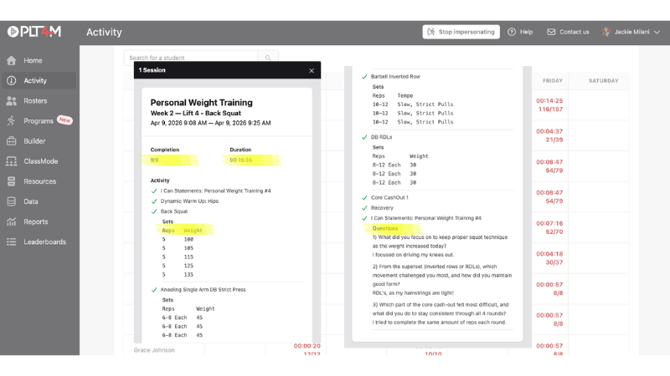
While PLT4M does not provide physical verification of a student's workout completion, the workout log includes several components that help teachers assess the accuracy and integrity of each submission.
Workout Log Components in PLT4M
Duration: the session timer is initiated when the student clicks "Start Session." The timer ends either when the student clicks "End Session," or completes all the exercises (the final "done" button will end the session). If there is >1 hour of inactivity, the session will automatically end, and log the end time as the time that the last button was pressed.
i.e. if you are seeing a session time close to 0:00, this means there was more than an hour of inactivity after the student pressed "start session."
Completion: Each exercise includes a “Done” button, indicating which parts of the lesson the student has completed.
Notes: Students may be prompted to log details such as weights used or modifications made. They can also add notes to any exercise for future reference.
Q&A: Certain lessons include reflection or review questions, typically at the end, which students are required to answer.
Tests: Some lessons include assessments or performance-based inputs that require students to submit a result.