
Adding staff allows them to view, edit, and manage them, while removing access removes those permissions.
To manage staff access for a group:
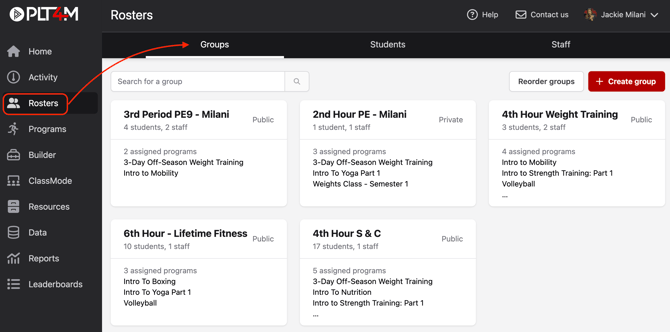
- Navigate to your Rosters page and choose the Groups tab
- Select a group
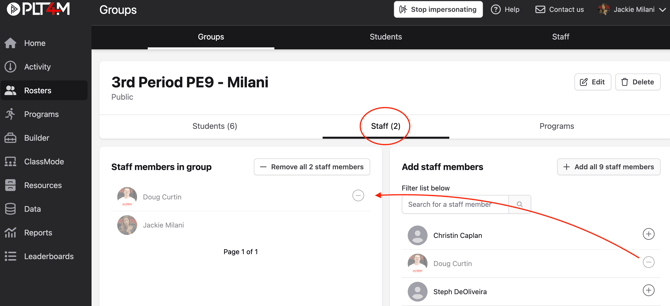
- Click into the Staff section of the manage group page
- Use the (+) and (-) buttons to add or remove staff members in the group. Changes will be automatically saved.
To manage staff access for a Program:
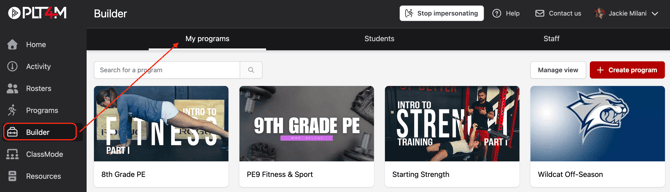
- Navigate to your Builder page and select the desired program under My Programs
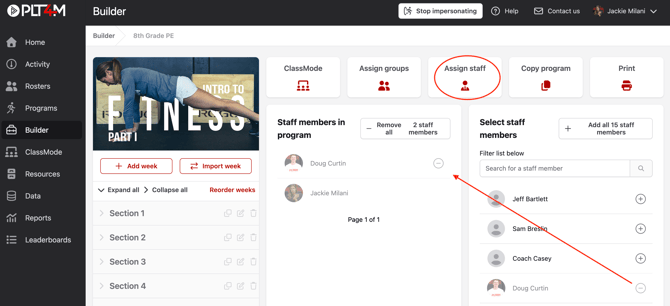
- Select Assign Staff
- Use the (+) and (-) buttons to add or remove staff members to the program. Changes will be automatically saved.
Please note: all staff members have access to view the PLT4M programs. Managing staff access only applies to any custom programs you've created.