
PLT4M workouts can be consumed a number of different ways—via individual device, shared device, or projector. If your school follows a no-phone policy, don't worry—we've got you covered!
This article highlights two features designed to minimize devices in your fitness center or weight room while still benefitting from technology in the classroom.
First up: Rack View
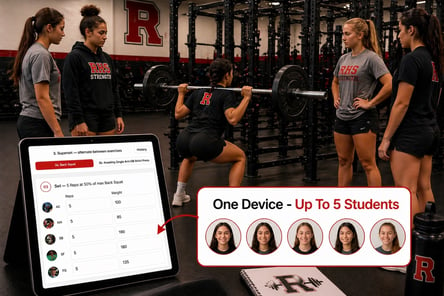
Rack View allows up to 5 students to access and log workouts via a shared device. Rack View is available in all student accounts on both web and app. Rack View can become the expected mode for accessing and logging workouts, or, can be used in a pinch when a student forgets their personal device.
Example scenario: Group your students in groups of 5 based on similar max lifts. Mount a school-issued tablet at each rack, and instruct one student per group to log into the tablet, and add the 4 other group members. Students can take turns viewing and logging their workout of the day.
This feature best supports: Weight training programs, or any program that includes individualized loading where students are expected to log weights, and/or record fitness tests. This feature is not ideal for follow-along workouts, unless students are following the same workout.
Please note: Rack View must be initiated by a student; it cannot be setup by a staff member. When students are finished logging their workout via Rack View, they'll be prompted to "Exit rack view." A new "rack view" must be initiated for each workout.
Next: ClassMode
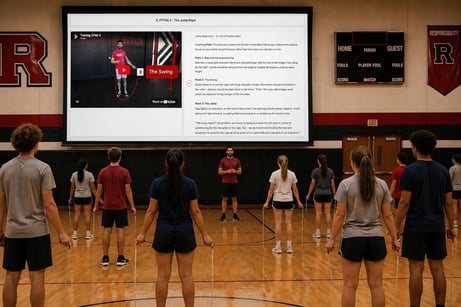
Prefer to workout as a group? ClassMode allows you to facilitate a group workout while tracking student participation through PLT4M. This feature was designed to support the "projector model," while allowing teachers and coaches to leverage workout tracking features.
Example Scenario: You'd like to facilitate a synchronous Bodyweight Bootcamp workout, and you'd also like the completed workout to appear in the students' workout log. You connect to a smartboard, and initiate a bootcamp workout through ClassMode. Students follow along with the instructor on the screen, all while receiving credit for the workout in PLT4M.
This feature best supports: Follow-along workouts, or any workout that does not include individualized loading.
Please note: Students do not have the ability to access or log prescribed weights or worksets via ClassMode, so we don't suggest using ClassMode if students are completing an advanced weight training program.
Don't be afraid to switch it up!
You do not need to choose one implementation style over another! It is perfectly acceptable to use a combination of both, depending upon your classroom environment on any given day.
Example Scenario: You may decide to facilitate weight training sessions via Rack View on Mondays, Wednesdays, and Fridays. On Tuesdays and Thursdays, you're taking your class through a low-impact mat routine, such as pilates. You decide to project the pilates workouts via ClassMode so that students can follow-along synchronously, and receive credit (in PLT4M) for the workout!