
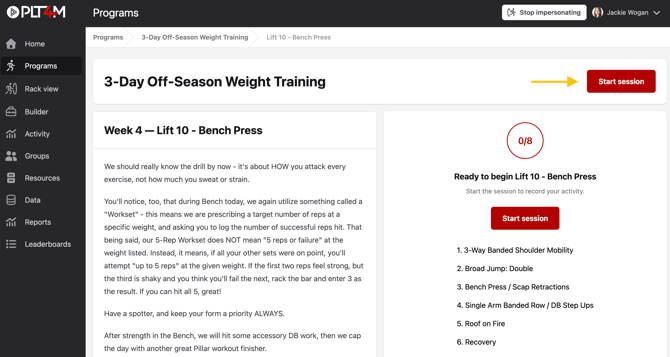
To log a workset:
- Navigate to your Program tab and begin a session
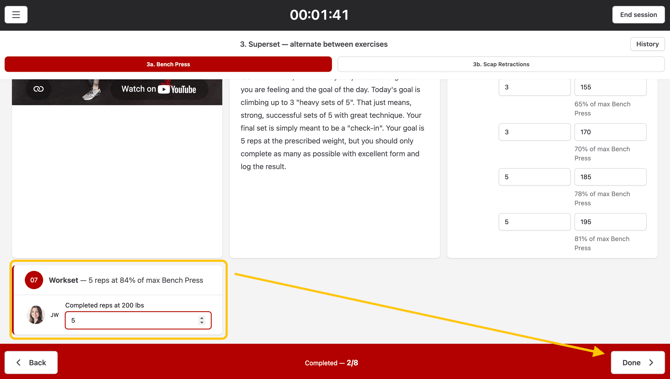
- Enter your workset result when prompted
- Select Done to save the workset
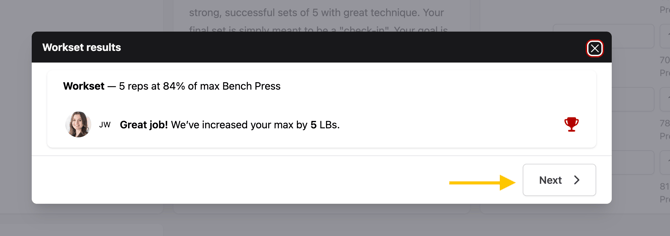
- Your workset result will display on the page
- Click Next to continue the workout
More about Worksets
What is a workset?
The goal of a workset is to assess a students performance that day for a specific lift and to make a subsequent adjustment to their working max.
Students are prompted to input the number of successful repetitions completed at a given percentage of a core max. Based on student feedback, the students associated max has the potential to increase, stay the same, or decrease in increments of 5 lbs.
Using Worksets frequently allows a more accurate working max and better overall training results.
How are maxes adjusted?
The maxes are adjusted automatically based on a set of rules built into the training program. After the student enters their result, they will see one of three messages:
- Great job - we've increased you max by 5 LBs
- Almost! - we're going to keep your max where it's at
- Don't sweat it - your max has been adjusted down 5 LBs
.png?width=670&height=343&name=Untitled%20design%20(3).png)
Where will I find Worksets?
Worksets are built into PLT4M's advanced weight training programs, and are tied to the core lifts: Squat, Bench, Deadlift, and Clean. Worksets can also be built into any custom program.